Review Your Day With AI: Turn Recordings Into Daily Transcripts
On this page
- The three-step loop, in one breath
- Step 1 — Record the day, not just the meeting
- Step 2 — Turn the day into a daily transcript, automatically
- Step 3 — Review your day with AI
- What AI actually gives you back: your day, visualized
- Zoom out: weekly and monthly reviews
- How to actually improve, not just track
- Keep it private: the non-negotiable part
- A realistic daily routine
- Choosing the right AI for the job
- Common mistakes that kill the habit
- The bottom line
Your calendar remembers your meetings. Your camera roll remembers the photogenic moments. But the actual texture of your day — what was said, what you decided, the idea you had in the car, the thing you promised to follow up on — mostly evaporates by the time you brush your teeth. You lived fourteen hours and can reconstruct maybe twenty minutes of it.
There's now a simple loop that fixes this: record your day, auto-export a daily transcript, and feed that transcript to an AI. Capture becomes text, text becomes searchable and summarizable, and an AI turns raw hours into a review you can actually use — day by day, week by week, month by month. This is a complete, practical guide to building that loop with BlackBox and keeping it private.
The three-step loop, in one breath
Everything below is just three steps repeated forever:
- Record the ambient audio of your day with an always-on recorder.
- Transcribe & export — BlackBox turns the audio into timestamped text on-device and its Daily transcript export saves yesterday's transcript to a folder each night, automatically.
- Review with AI — hand that transcript to an AI assistant and ask it to summarize, extract to-dos, and surface patterns.
Do this and you stop trying to remember your life and start querying it. Let's build each step properly.
Step 1 — Record the day, not just the meeting
Most people only hit record for the "important" moment — the interview, the doctor's appointment. The problem is you rarely know in advance which moment mattered. The offhand comment at lunch, the decision made walking to the car, the idea that arrived mid-drive — those are the ones you'd kill to have later, and they're exactly the ones you never thought to capture.
An always-on recorder solves this by removing the decision. You start it in the morning and it captures the ambient audio of your day in the background — with the screen off, without draining the battery, and without you thinking about it. A single day might look like this:
- A slow morning at home
- Two hours of turn-by-turn conversation on a drive
- The real event: a long lunch conversation about careers, money, and life choices
- The drive back with the radio on
- An evening winding down in front of the TV
None of that is "a meeting." All of it is your life. Fourteen hours of ambient audio is a black box that holds everything — but audio alone surfaces nothing. To make it useful, it has to become text.
The point of recording everything isn't to listen to everything. Nobody re-listens to fourteen hours. The point is to have a complete record you can transcribe and search, so the five minutes that mattered are still there when you go looking.
Step 2 — Turn the day into a daily transcript, automatically
This is the step that makes the whole thing effortless, and it's where the Daily transcript export feature earns its place.
First, download the on-device transcription model
In BlackBox, open Settings → Transcription model and tap Download transcription model. This pulls a speech-to-text model onto your phone so that transcription runs entirely on-device. Nothing leaves your iPhone to become text — no upload, no server, no account. Once it's downloaded, it works offline, on a plane, in a basement, anywhere.
This matters more than it sounds. You're about to create a written record of the most private hours of your life. The only responsible place to do that is on hardware you physically hold. On-device transcription is what makes an AI life-review defensible instead of reckless.
Then, turn on Daily transcript export
Open Settings → Daily transcript export and enable Export daily transcripts. Here's what the feature does, in plain terms:
- It saves a timestamped text transcript of the previous day
- It writes to a folder you choose (tap Choose folder — a Files/Drive folder works well)
- It runs automatically, while your phone is charging — so it never interrupts your day or drains your battery
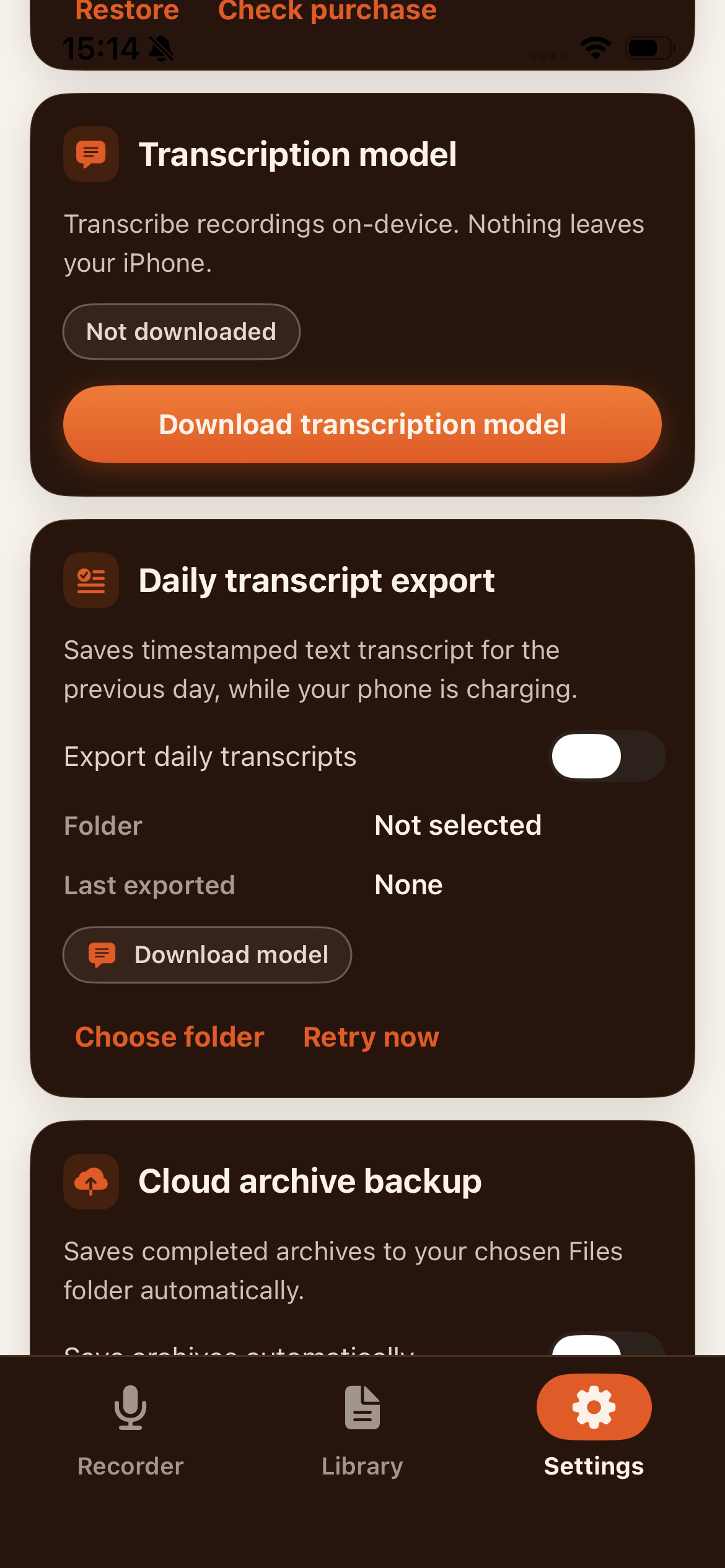
The design here is deliberate. You plug your phone in at night; while you sleep, yesterday gets written out as clean, timestamped text and dropped into your folder. By morning, the day you just lived is sitting there as a searchable document. If a night gets skipped, there's a Retry now button, and Last exported tells you where you stand.
The result is a growing archive of plain-text days, each one looking roughly like:
`` 07:11 [morning at home, getting ready] 09:38 [drive — conversation about the trip] 11:50 [lunch — the long talk: careers, US vs Canada, salaries, startups] 13:30 [drive back, radio] 15:50 [evening, TV] ``
Timestamps are the secret ingredient. They let you — and later, an AI — reason about when things happened, how long they lasted, and how your day was actually shaped. A wall of undated text is a diary; a timestamped transcript is data.
Why timestamped text beats audio for review
| Raw audio | Timestamped transcript | |
|---|---|---|
| Searchable | No — you have to scrub | Yes — Ctrl+F any word |
| Skimmable | No — real-time only | Yes — read in minutes |
| AI-readable | Needs conversion first | Ready to paste |
| Archival size | Large | Tiny, future-proof text |
| Shows the day's shape | Hidden | Visible via timestamps |
Audio is the capture format. Text is the thinking format. The daily export is the bridge between them, and because it's automatic, you never have to remember to build that bridge yourself.
Step 3 — Review your day with AI
Now the payoff. You have a clean, timestamped transcript of yesterday. Open your AI assistant of choice, paste it in (or point a local model at the folder), and start asking questions. This is where hours become insight.
The daily review prompt
Here's a starting prompt that turns a raw transcript into a real end-of-day review:
"Here is a timestamped transcript of my day. Give me: (1) a 5-bullet summary of what actually happened, (2) any decisions I made or commitments I gave, (3) a to-do list of anything I said I'd follow up on, (4) one thing that seemed to drain my energy and one that gave me energy, and (5) a single question I should reflect on tonight."
In seconds you get back the review you'd never sit down and write by hand:
- A summary — the day compressed to its five real events, so it doesn't blur into every other day.
- Decisions & commitments — "You told Sarah you'd send the numbers by Thursday." That promise no longer lives only in your fading memory.
- A to-do list you didn't know you had — the follow-ups you said out loud and would otherwise drop. This alone can justify the whole habit.
- Energy signals — the AI can spot that your good stretch was the walk, and your flat stretch was the third back-to-back call.
- A reflection prompt — a nudge toward the kind of thinking that usually gets skipped.
This is the same active-recall benefit a manual daily review gives you, except the AI does the summarizing and you keep the reflecting. The friction that makes people quit journaling is gone.
Going beyond the summary
Once you're comfortable, the transcript becomes something you can interrogate:
- "What did the contractor actually quote me, and when?"
- "Pull every idea I mentioned today and list them as bullet points."
- "Draft a follow-up message based on my conversation with Alex at lunch."
- "I felt off today — read the transcript and tell me if anything stands out."
- "Turn my rambling car monologue into three clean notes."
The transcript stops being a record and becomes a thinking partner that was there all day. It remembers the details you don't so you can work with them instead of straining to recall them. This is the practical version of a personal second brain: capture by voice, convert to text, and let AI help you use your own past.
What AI actually gives you back: your day, visualized
Text summaries are only the start. Because the transcript is timestamped, an AI can do something no paper journal ever could — turn a day into a picture. Ask it to read the transcript and describe the day as a shape, and you get a dashboard of your own life:
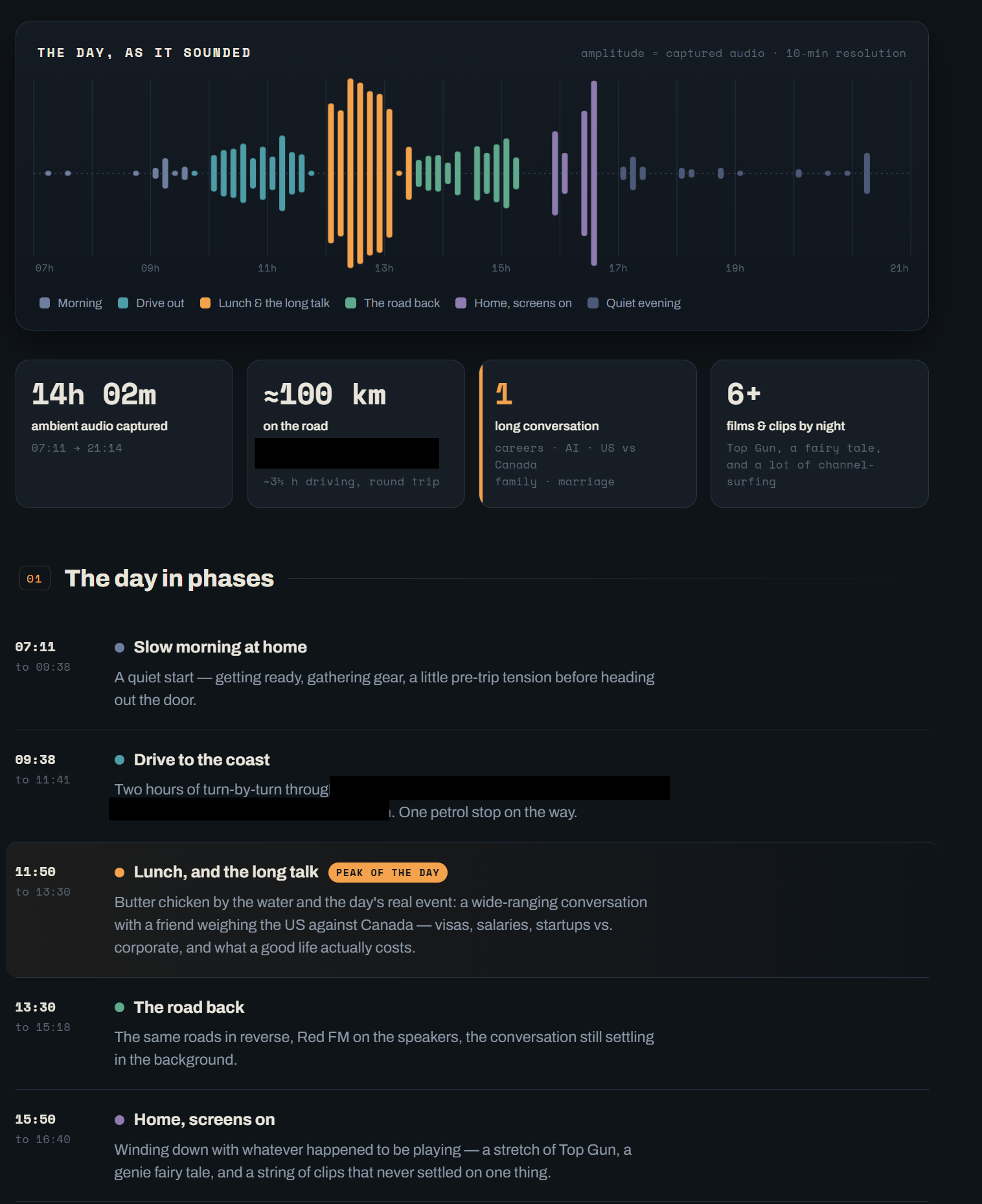
Look at what the AI reconstructed from nothing but a timestamped transcript:
- A waveform of the whole day — louder where conversation was dense, quiet where it wasn't. The peak at lunch isn't guessed; it's where the words were.
- Phases with names and colors — "Slow morning at home," "Drive to the coast," "Lunch, and the long talk," "The road back." The AI segmented fourteen hours into the handful of chapters that actually happened.
- Stat cards — 14h 02m of ambient audio captured, ≈100 km on the road, one long conversation about careers, AI, US vs Canada, 6+ films and clips by night. Every figure was inferred from the transcript.
- The peak of the day, flagged — the AI marked the lunch conversation as the real event and summarized what it was about: visas, salaries, startups vs. corporate, and what a good life actually costs.
- A readable story — each phase gets a sentence of narrative, so the day reads like a page, not a log.
This is the "wow" of the whole workflow. You lived a normal day and did nothing but keep the recorder on and let the nightly export run. In return you get a review that remembers the day better than you do — searchable, shaped, and story-shaped. Run the same prompt every day and you can literally see the difference between a scattered day and a focused one before you read a single word.
The prompt is simple: "Read this timestamped transcript and lay my day out as a dashboard — a waveform of when it was loud or quiet, the day broken into named phases with a one-line story each, and stat cards for total hours, time on the road, key conversations, and anything notable." The AI does the rest.
Zoom out: weekly and monthly reviews
The real magic isn't one day — it's what happens when you have thirty of them in a folder.
The weekly review
At the end of the week, hand the AI seven daily transcripts (or seven of its daily summaries) and ask:
"Here are my transcripts for the past week. What did I spend the most time on? What did I say I'd do but never followed up on? What themes or worries came up more than once? What was my best day and why?"
Now you're seeing patterns no single day reveals — see what a full week of transcripts actually looks like when you analyze it. The task you've mentioned pushing back four days running. The topic you keep circling. The fact that your best days all started with a walk. A weekly review built from real transcripts isn't guesswork about how your week went — it's evidence.
The monthly and quarterly view
Feed a month of summaries and the questions get bigger and more honest:
- "What did I actually make progress on this month versus just talk about?"
- "Which relationships showed up most in my conversations?"
- "What was I anxious about at the start of the month that resolved — or didn't?"
- "If a stranger read my month, what would they say I care about?"
Over a quarter, a year, this becomes a searchable, AI-queryable record of your life — the thing memory promises to be but never is. You can search your whole life with transcripts the way you search your email, and you can ask an AI to find the throughlines you're too close to see. That's audio lifelogging with an analyst attached.
How to actually improve, not just track
Tracking is only worth it if it changes something. Here's how to turn the loop into improvement rather than a data-hoarding hobby:
- Look for the gap between words and actions. Ask the AI to compare what you said you'd do against what shows up as done in later transcripts. The recurring gaps are your real bottlenecks.
- Find your energy pattern and protect it. If two weeks of reviews show mornings are your sharp window, stop spending them on email. Let the data pick your schedule.
- Close loops before they cost you. The daily to-do extraction catches dropped promises while they're still cheap to fix — a reply, a callback, a commitment you'd have forgotten.
- Notice the themes you avoid. The subject that keeps surfacing in your monologues but never in your actions is usually the important one. AI is good at pointing at it without judgment.
- Review the wins, not just the misses. Ask specifically for what went well. A month of noticed small wins changes how the year feels.
The loop's whole value is that it replaces vibes about your life with a record of it — and a record you can question is a record you can act on.
Keep it private: the non-negotiable part
Building a written, AI-queryable log of your life is powerful, which is exactly why privacy can't be an afterthought. The architecture matters:
- Capture and transcription stay on-device. BlackBox records and transcribes on your phone, with no account and no upload. The most sensitive step — turning your day into text — never touches someone else's server. See on-device transcription for how that works.
- You own the transcript file. The daily export writes to your folder. Nothing is auto-shared. You decide what happens next.
- The library is locked. Your recordings sit behind Face ID.
- You control the AI step. This is the one point where text could leave your device, so treat it deliberately. For maximum privacy, run a local/on-device AI model over the folder. For convenience with a cloud assistant, redact names and specifics first — an AI can still summarize a transcript where "Alex" becomes "a friend."
The rule of thumb: a record of your life is only a good idea if it stays yours. On-device capture plus a transcript you control is what makes an AI life-review empowering instead of a liability.
A realistic daily routine
Put together, the habit costs almost nothing:
- Morning: Start recording. Yesterday's transcript is already in your folder from last night's export.
- All day: Live normally. The recorder runs in the background, screen off.
- Night: Plug in your phone. While it charges, BlackBox writes out today's transcript automatically.
- Five minutes, whenever: Paste yesterday's transcript into your AI, run your review prompt, skim the summary, note the to-dos.
- Sunday: Run the weekly prompt over the week's transcripts.
- Month's end: Run the monthly prompt.
That's the entire system. The recorder handles capture, the daily export handles the tedious conversion, and the AI handles the heavy reading — leaving you with just the part humans are actually good at: deciding what to do about what you find.
Choosing the right AI for the job
Not every AI step needs the same tool. Match the tool to the sensitivity and the job:
- Local / on-device models (run on your own computer) are the private default. The transcript never leaves your hardware, so you can hand over the raw text, names and all. Great for daily and weekly reviews you run yourself.
- Cloud assistants are more capable and effortless, but the text leaves your device. Reserve them for transcripts you've redacted, or for asking about your own notes and monologues rather than other people's words.
- A hybrid works well in practice: use a local model to produce a de-identified daily summary, then let a cloud assistant reason over those clean summaries for the bigger weekly and monthly views.
The transcript is a file you control, so you're never locked in. You can start with whatever AI you already use and tighten privacy as the habit — and the archive — grows.
Common mistakes that kill the habit
Most people who try a system like this quit for predictable reasons. Sidestep them:
- Trying to re-listen to everything. You never re-listen to raw audio, and you don't need to. The transcript is the interface; the audio is just the backup. Read, don't replay.
- Reviewing at the wrong time. Anchor the AI review to something you already do — coffee, the commute, plugging in at night. A daily review that floats with no trigger gets skipped.
- Perfectionism. A scrappy five-minute AI summary every day beats an elaborate analysis you do twice and abandon. Consistency compounds; polish doesn't.
- Hoarding without acting. A folder of transcripts you never question is just clutter. The value is in the questions you ask, and in doing one small thing differently because of an answer.
- Ignoring privacy until it bites. Decide your AI-step rules up front — local model, or redact-then-paste — so you never have to wonder later where a sensitive transcript ended up.
Avoid these five and the loop becomes something you keep for years, not weeks.
The bottom line
You can't improve a day you can't remember, and you can't remember a day that vanished into thin air. The loop of record → auto-export daily transcript → review with AI turns the ungraspable stream of your life into something you can read, search, question, and learn from — while keeping the sensitive parts on your own device.
BlackBox is built for exactly this: always-on recording, on-device transcription, and automatic Daily transcript export that hands you yesterday as clean text every morning. Turn it on tonight, feed tomorrow's transcript to an AI, and start reviewing your life instead of forgetting it. Free on iOS and Android, with everything kept on your device.
Frequently asked questions
How do I review my day with AI?
Record your day with an always-on recorder, transcribe it to timestamped text, then paste that transcript into an AI assistant and ask it to summarize what happened, surface decisions and to-dos, and flag patterns. BlackBox automates the hardest part — it auto-exports a timestamped transcript of the previous day to a folder each night, so you always have clean text ready to feed the AI.
Is it private to feed my day to an AI?
The recording and transcription happen entirely on-device in BlackBox — nothing is uploaded to transcribe. You stay in control of the transcript file, so you decide what, if anything, ever goes to a cloud AI. For maximum privacy, use a local/on-device AI model; for convenience, redact names before pasting into a cloud assistant.
What is the daily transcript export feature?
It's a BlackBox setting that saves a timestamped text transcript of the previous day to a folder you choose, automatically, while your phone is charging. Turn it on, pick a folder, and each morning you have yesterday written out as searchable text — ready to review, archive, or hand to an AI.
Do I need internet or an account to transcribe my day?
No. BlackBox transcribes on-device with a downloadable model, works offline, and needs no account. Only the optional step of sending a transcript to a cloud AI requires the internet — and that's your choice.
Always-on, on-device and private. Free on iPhone and Android.